
DNS propagation checks confirm that your domain’s DNS records have updated correctly and are resolving across global DNS servers. You need to verify propagation after pointing your domain to a new server, changing mail routing or configuring subdomains.
You will use two external tools to check DNS records and monitor how they resolve worldwide. This helps you troubleshoot access issues and confirm that DNS changes have taken effect.
Check DNS records with MXToolbox
MXToolbox SuperTool queries specific DNS record types for your domain. This confirms that records like A, MX, CNAME and TXT resolve correctly from external DNS servers.
- Open the MXToolbox SuperTool.
Navigate to mxtoolbox.com/SuperTool.aspx in your browser. - Enter your domain name.
Type your domain into the search box at the top of the page.
 Enter your domain in the MXToolbox search box.
- Select the record type.
Click the dropdown menu next to the search box and choose the DNS record type you want to check. Options include A Record, MX Record, CNAME and TXT Record.
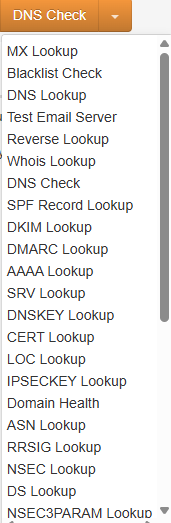 Select the DNS record type from the dropdown menu.
- Run the lookup.
Click the search button to query your domain’s nameservers. The results display the current DNS records and confirm whether they resolve externally.
 DNS check results confirm how your domain resolves externally.
MXToolbox confirms that your DNS records match what you configured. If the results differ from your expectations, your changes may not have propagated yet or the records need updating.
Monitor global propagation with What’s My DNS
What’s My DNS checks how your domain resolves across DNS servers in different regions worldwide. This helps you identify propagation delays and troubleshoot regional access issues.
- Open What’s My DNS.
Navigate to whatsmydns.net in your browser. - Enter your domain name.
Type your domain into the search box on the homepage.
 Enter your domain in the What’s My DNS search field.
- Choose the record type.
Click the dropdown menu and select the DNS record you want to check. A records show where your website points, while MX records display mail server configuration.
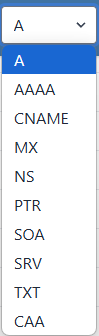 Select the DNS record type you want to query.
- Run the global check.
Click the search button to query DNS servers worldwide. The results display as a map and list showing which regions have received your DNS updates.
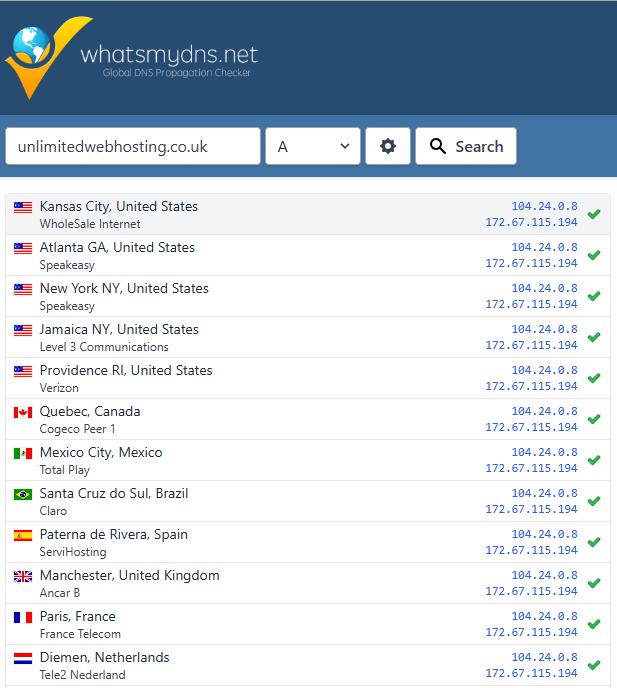 Global DNS propagation results show regional resolution status.
Green ticks indicate that DNS servers in those regions are resolving your domain correctly. Red crosses show servers that have not received the updates yet. DNS propagation typically completes within 24 to 48 hours, though changes often appear much faster.
Wrapping up
You can now check DNS propagation using MXToolbox for specific record verification and What’s My DNS for global propagation monitoring. These tools confirm that your DNS changes have taken effect and help you troubleshoot access issues.